Contents

VoiceGuide Help
1. Introduction
Welcome To VoiceGuide
Which version to use
2. System Configuration
System Requirements
Installing v7.x - Dialogic
Installing v7.x - VoIP / HMP
Installing v6.x - Dialogic
Installing v5.x - Voice Modems
Installing v5.x - CAPI compatible cards
Installing v5.x - Dialogic
Installing v5.x - Dialogic Wave Drivers
Text To Speech
Call Transfers and Conferencing
ODBC Data Sources
End of Call Detection
Distinctive Ring Detection
T1/E1 ISDN Configuration
T1/E1 RobbedBit/CAS/R2 Configuration
VoIP Line Registration
Command Line Options
Registering VoiceGuide
Unique System Identifier
3. Script Design
Introduction
Graphical Design Environment
Module Types
Paths
Result Variables
Call Start
Call Finish
Multilanguage Systems
Protected Scripts
Sound files
Testing Scripts
4. Modules Reference
Play
Record
Get Numbers
Say Numbers
Transfer Call
Send Phone Message
Send Pager Message
Send Email
Database Query
Run Program
Time Switch
Evaluate Expression
Run VB Script
Send DDE Command
Hangup Call
5. Fax
Introduction
6. Voicemail
Introduction
Voicemail System Manager
Voicemail Menus
Message Lamps
7. Outbound Dialing
Loading Numbers to Call
Detect Call Answer
Outbound VoIP calls
Predictive Dialers
External Database Source (v7)
8. Speech Recognition
Introduction
Grammars
Install LumenVox
9. Logs
Script Logs
Call Detail Records (CDRs)
10. ActiveX / COM Interface
Admin_TraceLogAdd
Dialer_MakeCall
Dialer_OutDialQueAdd
Bridge_Connect
Bridge_Disconnect
Line_Hangup
Line_Pickup
Play_Start
Play_Stop
Record_Stop
Record_Start
Record_2Lines_Start
Run_ResultReturn
RvGet
RvGet_All
RvGet_AllXml
RvSet
RvSet_RvList
Script_Gosub
Script_Goto
Script_Return
Serial_Tx
Vm_Event
Vm_VmbConfig_Get
Vm_VmbConfig_Set
11. PBX Integration (CTI)
Inband Signaling
Ericsson MD110 Voicemail Interface
Legal Information
Copyright & Disclaimer

 
Home
VoiceGuide Online Help
Prev Page Next Page


Message Lamps

VoiceGuide has can instruct the PBX to turn on the telephone extension's 'message lamp' when a new voicemail message has arrived, and to turn off the 'message lamp' once the message has been heard.

In VoiceGuide Script Editor got to the Edit menu and select go PBX Command Strings option, then click on the Message Lamps tab. The following should be displayed:
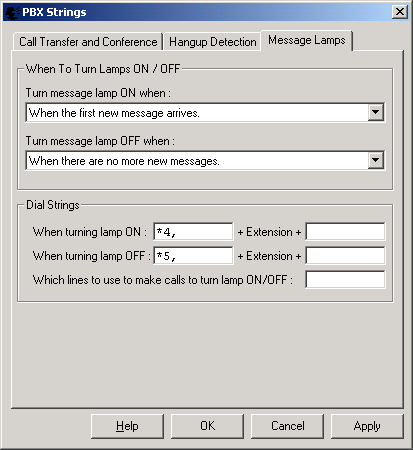
The top section of the window allows administrator to select when signals to the PBX to turn the message lamps on/off should be sent.

The "Dial Strings" section is used to define what are the DTMF signals which VoiceGuide needs to send to the PBX to turn the message lamps on/off.

In the example shown in the above screenshot VoiceGuide has been configured to send DTMF tones *4,Ext (where Ext is the Extension number) when the first new voicemail message arrives and *5,Ext when the voicemail box owner has saved or deleted all of the 'New' voicemail messages.

The sending of the DTMF tones is done by VoiceGuide picking up one of the lines and dialing the DTMF tones specified. Eg. if in the above example the extension number was 1234 then to turn the lamp ON VoiceGuide would pick up a line and dial *4,1234 (with the comma indicating a short pause). It is possible to limit on what lines VG is allowed to send these lamp on/off messages. The lines on which the sending of message lamp messages is allowed can be specified by just typing in the Line IDs separated by commas. If the line selection text box is left blank then any of the currently available lines will be used.


The Message Lamp feature is only enabled in the 'Evaluation' and 'Enterprise+Dialer' versions of VoiceGuide.

Converted from CHM to HTML with chm2web Pro 2.84 (unicode)