 Play Module
The Play module can:
- Play sound files
- Text-To-Speech (TTS)
- Speech-To-Text (STT)
- Play DTMF tones
- Send Hookflash signal
While playing the module will listen for a response from the caller. You can select the number of times the message will be re-played, and the pause between the replays.
Result Variables can be used when specifying the sound file to be played. In the example below the file played will be different depending on what selection the caller made in the 'Get Language' module.
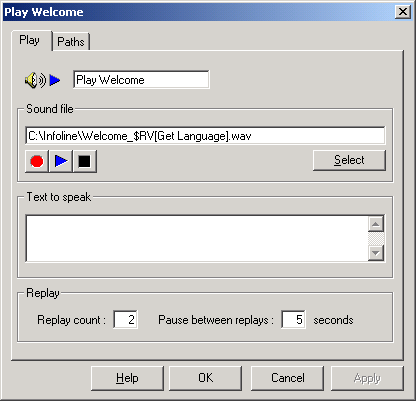
Multiple sound files can be selected to be played by separating the successive files by commas. eg:
prompts\1.wav, prompts\2.wav
would result in two files from the script's prompts subdirectory being played (1.wav and 2.wav) one after another.
If the sound files are specified without a full path then VoiceGuide will search for the sound files in the script's directory, or in a script's \voice\ subdirectory (if it exists).
If one or more of the sound files to be played cannot be found
then VoiceGuide will see if a path SoundFileNotFound is defined in the module.
If the path SoundFileNotFound is defined then that path will be taken.
If the path SoundFileNotFound is not defined then VoiceGuide will play the
system sound file SoundFileNotFound.wav in place of the sound files that cannot be found.
Text-To-Speech (TTS)
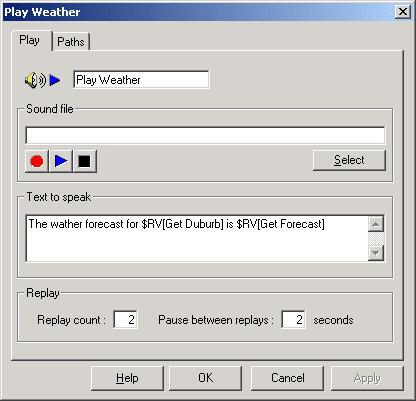
The text entered in the "Text to speak" box will be spoken. XML tags can be used within the specified text. For full details on the XML tags which can be used please refer your TTS engine's reference.
If a text file is specified in the ”Sound File” text box then
VoiceGuide will read in the text file and will speak (TTS) the contents of that file.
The text file should have a .TXT suffix.
Speech-To-Text (STT)
If Speech to Text (STT) is enabled in the module, VoiceGuide will start playing the specified sound file or TTS as normal, but will also listen out for any speech from the caller.
When speech barge-in is detected, VoiceGuide will stop playing, and will forward any received speech to the STT engine.
The STT engine recognition results are then saved in Result Variables, as they are provided by the STT engine.
When STT engine indicates that speech has completed, VoiceGuide will take the following path if defined:
stt_end
Silence paths can also be used to react to end of speech faster.
Please see Configuring STT for more information.
Paths
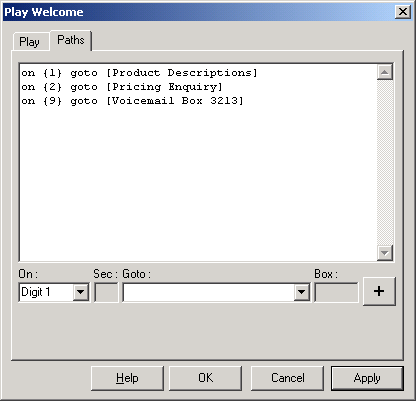
Paths specify which module the caller will go to if a matching response is made by the caller. eg:
A Timeout path is taken if no key has been pressed within the specified number of seconds after the last replay of sound file(s) has completed. If no Timeout path is specified and no selection is made within 10 seconds of the last message replay finishing, VoiceGuide will hang up the call.
While sound file is playing, keyspresses can be used to skip forward/back or to adjust playback speed and volume. Special PLAY ACTION type paths need to be specified to achieve this:
on {Trigger} goto [PLAY ACTION - Pause]
on {Trigger} goto [PLAY ACTION - Resume]
on {Trigger} goto [PLAY ACTION - Jump Forward]
on {Trigger} goto [PLAY ACTION - Jump Back]
on {Trigger} goto [PLAY ACTION - Jump To Start]
on {Trigger} goto [PLAY ACTION - Jump To End]
on {Trigger} goto [PLAY ACTION - Speed Increase]
on {Trigger} goto [PLAY ACTION - Speed Decrease]
on {Trigger} goto [PLAY ACTION - Speed Reset]
on {Trigger} goto [PLAY ACTION - Volume Up]
on {Trigger} goto [PLAY ACTION - Volume Down]
on {Trigger} goto [PLAY ACTION - Volume Reset]
on {Trigger} goto [PLAY ACTION - Speed Volume Reset]
eg:
on {4} goto [PLAY ACTION - Jump Back]
etc.
The skip forward/back size can be adjusted by setting a value of following Result Variables in the Evaluate Expression module:
$RV[playaction_skipbackbytes]
$RV[playaction_skipforwardbytes]
Playing DTMF tones and Hookflash
The Play module can also play DTMF tones, and send Hookflash signals. To specify the DTMF tones to send, type in the DTMF tone sequence in the “Sound File” text box. An exclamation mark “!” indicates a hookflash, and a comma “,” indicates a pause, whilst characters “0-9“ and “A-D“ are used to indicate DTMF tones
When using Dialogic cards any combination of DTMFs, hookflashes and pauses can be specified on the one line and the Dialogic card will play them correctly.
TAPI devices can usually only specify either a hookflash or DTMF tones in a Play module. This means that in order to have a TAPI device send a hookflash followed by DTMF tones you may need to use two Play modules one after another. The first Play module would just contain the hookflash, and the next module will contain the DTMF string. You should then use a Timeout path to link the two modules together (eg: on {Timeout 1} goto [Dial Number] ). In this situation using the Timeout path allows you to specify exactly how long after the hookflash will the DTMF tones be dialed. Pause characters cannot be used at all with many TAPI devices.
Automated DNIS based file selection
VoiceGuide allows per-DNIS sound file specification.
If DNIS is supplied on the call then VoiceGuide will see if a "DNIS-tagged" derived filename exists. The "DNIS-tagged" derived filename is the original filename with a "_DNIS" inserted just before the ".wav" in the filename.
eg. if the Play module is configured to play a file welcome.wav and the DNIS on the call is 1234 then VoiceGuide will first search for file welcome_1234.wav If welcome_1234.wav does not exist then VoiceGuide will play the sound file welcome.wav
NB: DNIS is an expression indicating the number dialed by the caller, and is only really available on ISDN and VoIP systems. On analog systems a close replacement of this functionality can be achieved by using $RVs within the filename to be played, and setting that $RV value previously, based on Inband Signaling or user selection etc.
