 Transfer Call Module
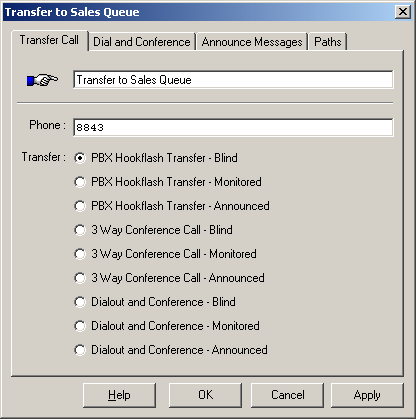
The Transfer Call module will transfer the call to another extension or telephone number.
All types of call transfers are supported:
- 'Dial and Conference' / 'Trombone' / 'Bridge' transfers
- 'Group' transfers
- Transfers to ACD queues
- SIP REFER transfers (used on VoIP - SIP)
- 'Hookflash' transfers (used on Analog lines)
- TBCT transfers (used on ISDN trunks)
- 3-way transfers
Result Variables can be used when specifying the transfer destination, sound files, call options etc.
Dial and Conference / Tromboned Transfers
Supported on all VoIP systems and JCT and DMV series cards (eg. D/41JCT, D/120JCT, DMV160, D/240JCT, DMV600B etc.)
The D4PCIU* family cards do not support "Dial and Conference".
The Dialer add-on is required to use the "Dial and Conference" option.
Dial and Conference - Blind
- Dials the second number on another line.
- Connects the two calls together.
VoiceGuide will immediately take the Success path if it is defined, otherwise VoiceGuide will wait and hang up when:
- busy
- maximum connection time is reached
- digit "*" is pressed during conversation
Dial and Conference - Monitored
- Dials the number on another line.
- Listens to see if the outgoing call is answered by a human or an answering machine.
- If a human or answering machine answer is detected then VoiceGuide connects the two calls together.
- If an announce message is specified the announce message is played to the call recipient before the call is connected.
- If call is answered VoiceGuide will connect the two calls and take the Success path if it is defined.
- If call is not answered VoiceGuide will take the Fail path.
VoiceGuide can also wait in the module and hang up when:
- either line hangs up
- maximum connection time is reached
- digit "*" is pressed during conversation
Dial and Conference - Announced
- Dials the number on another line.
- When call is answered VoiceGuide plays the announce message to the call recipient, and waits for a keypress from the call recipient indicating whether they accept the call or not.
- Call recipient can then select whether to accept the call or not. "1" is used to accept the call, any other keypress indicates that the call is declined.
- If call is accepted VoiceGuide will connect the two calls and take the Success path if it is defined.
- If call is not accepted VoiceGuide will take the Fail path.
VoiceGuide can also wait in the module and hang up when:
- either line hangs up
- maximum connection time is reached
- digit "*" is pressed during conversation
Dial and Conference Options
Following user settable fields are available in Transfer module when "Dial and Conference" transfers are used:
- On-hold sound file to play while connection is made
- Line selection list
- When to connect the two callers
- Options
The Options field can be used to specify the outgoing CallerID used for the call by using the XML syntax.
eg: specifying <CallerId>5551234</CallerId>
would result in CallerId to be set to 5551234 on outgoing calls.
Note that the CallerID settings in Config.xml would take precedence if set.
Dial and Conference on VoIP
If the Headers fields need to be added/modified in the outgoing SIP INVITE packet then these can also be specified in the Call Options field when
loading the outgoing call. To add a SIP header a "<sip-header>" entry needs to be specified in the Call Options field.
eg: to add a "MyHeader" header, this entry could be added to the Call Options field:
<sip-header>MyHeader: "somevalue" <sip:123456@sip.router.com></sip-header>
Ring Group Transfer
Multiple parties can be dialed at the same time, with call connected to the party that answers first.
As soon as one call is answered all other calls are hung up.
This option can only be used on "Dial and Conference" type transfers.
To perform a Ring Group Transfer the multiple telephone numbers are specified separated by the & character.
eg:
5551111&5552222&5553333&5554444
Will result in calls to 4 numbers being placed, with the original caller then connected to the party that answers first.
ACD Queue Transfer
Call can be placed in ACD queue, and from the queue the call will then be transferred
to an agent when the appropriate agent becomes available.
To place call in an ACD queue the following expression is used:
acd:QueueName
eg:
acd:sales
VoiceGuide will search for agents that are qualified to receive calls from specified queue,
and the call is then connected (using a 'tromboned' connection) to the agent.
To receive ACD calls, agents need to use the 'VoiceGuide Agent' application on their PC.
SIP REFER Transfer (RFC 3515)
To perform the RFC3515 REFER transfer select "Blind Hookflash Transfer" option and specify the IP/URI address of the transfer destination.
Two B-Channel Transfer (TBCT)
VoiceGuide v7 can perform TBCT transfers on ISDN lines which support this feature. To perform a TBCT transfer a 'Dial and Conference' transfer type needs to be selected, and then in the 'Dial and Conference Options' text box you need to include either:
<tbct_on>2ND_LEG_ALERTING</tbct_on>
or
<tbct_on>2ND_LEG_CONNECTED</tbct_on>
The <tbct_on>2ND_LEG_ALERTING</tbct_on> option will result in TBCT command being issued to the switch at the time when the 2nd leg of the call is in Alerting phase (2nd number begins to ring), and the <tbct_on>2ND_LEG_CONNECTED</tbct_on> option will result in TBCT commend being issued to the switch at the time when the 2nd leg of the call has connected (2nd call was answered).
Running Scripts on Outgoing Call Legs
By default no script runs on the port that is used to make the outgoing call for the 2-line "Dial and Conference" transfer.
If needed, a script on that port can be started using the Script_Goto command.
This may be useful if for example it is required that the outgoing leg of the transferred call continues after the call on the original leg has ended.
Event Paths
The following event paths can be taken from the module:
| SUCCESS | the call was transferred successfully |
| FAIL | the call was not transferred, or transfer was declined |
| BUSY | number was busy |
| FAX | call was answered by a fax |
| NOANSWER | there was no answer |
| NODIALTONE | there was no dialtone |
| NORINGBACK | call was not answered and no ringback was heard |
| OPERATOR | SIT tone was heard indicating number is most likely disconnected |
| CONNECT | transfer completed successfully |
| AM | transfer completed successfully with Answering Machine answering the call |
| VOICE | transfer completed successfully with a live Human answering the call |
| CADENCE | transfer completed successfully based on cadence analysis |
| LOOPCURRENT | transfer completed successfully based on loop current detection |
Timeout Paths
The following timeout paths can be set:
NOANSWER |
Call was not answered within the specified timeout. If this timeout occurs time the 2nd leg of call is disconnected and the original caller is taken to the specified module. eg: on {noanswer 20} goto [try another number] |
CALLTIME |
Sets maximum call time. If this timeout occurs time the 2nd leg of call is disconnected and the original caller is taken to the specified module. eg: on {calltime 3600} goto [max calltime reached] |
TIMEOUT |
If the NOANSWER and CALLTIME timeout paths are not set then this timeout path is used instead (if defined). When this timeout is reached the 2nd leg of call is not automatically disconnected. This timeout path can be used to play messages to either side of call during the call. etc. eg: on {timeout 600} goto [play 10min warning] |
Result Variables
For Tromboned transfers the following $RVs are created on both lines:
$RV[Conf_DevName_1]
$RV[Conf_LineId_1]
$RV[Conf_LineNbr_1]
$RV[ModuleTitle_DevName_1]
$RV[ModuleTitle_LineId_1]
$RV[ModuleTitle_LineNbr_1]
$RV[Conf_DevName_2]
$RV[Conf_LineId_2]
$RV[Conf_LineNbr_2]
$RV[ModuleTitle_DevName_2]
$RV[ModuleTitle_LineId_2]
$RV[ModuleTitle_LineNbr_2]
These $RVs can be further used to manage the connected calls in the future. vgEngine trace file contains more information on other $RVs created during the call transfer process.
Hookflash Transfers on Analog systems
Hookflash Transfer - Blind
- Dials the signal specified (usually just a hookflash),
- Dials the telephone number,
- Hangs up immediately
The caller will now be connected to another extension. VoiceGuide no longer monitors the call.
Some PBXs/Switches require that the destination extension starts ringing before VoiceGuide can hang up. When using such systems it may be necessary to add a comma or two at the end of the destination number to make VoiceGuide pause for a while after dialing the number and before hanging up the call.
Some PBXs/Switches require that the destination extension is answered before VoiceGuide can hangup. In such situations the "Announced" or "Monitored" transfer option will need to be used.
Hookflash Transfer - Monitored
- Dials the signal specified (usually just a hookflash),
- Dials the telephone number,
- Listens to see if a call is answered by a human or an answering machine.
- If a human or answering machine answer is detected then VoiceGuide hangs up, which completes the transfer.
- If no answer is detected or the extension is busy then VoiceGuide will dial the 'retrieve call from announced transfer' signal (usually just a hookflash) and go down the Fail path.
Hookflash Transfer - Announced
- Dials the signal specified (usually just a hookflash),
- Dials the telephone number,
- Listens to see if a call is answered by a human or an answering machine.
- When a human or answering machine answer is detected then VoiceGuide plays the announce message to the call recipient.
- If the announce message is not specified then VoiceGuide will play the Caller's ID using the pre-recorded system sound files TsfrCallFrom.wav, TsfrAskAccept.wav and the Digits .wav files.
- Call recipient can then select whether to accept the call or not. "1" is used to accept the call, any other digit indicates that the call is declined.
- If the call is accepted VoiceGuide will dial the 'complete announced call transfer' signal (usually nothing is needed) and hang up and allow the two new parties to continue conversation.
- If the Success path is defined then that path will be taken, but script should be designed in such a way that VoiceGuide hangs up soon, so that the two parties can speak to one another.
- If the call is declined, the called party does not answer, or the extension is busy then VoiceGuide will dial the 'retrieve call from announced transfer' signal (usually just a hookflash) and then the "Fail" path is taken.
Note:
On Analog lines, when specifying the number to dial you can use commas ',' to indicate pauses in the dialing sequence. To include a pause between the hookflash and the telephone number being dialed a number of commas can be added before the phone number. Like this:
,,8843
On ISDN and VoIP connections commas cannot be used.
If your system requires other specialized PBX signaling keep in mind that Hookflash and DTMF signals can also
be generated using the “Play” module.
“!” is used to generate a hookflash and digits are used to generate DTMF tones.
Timeout paths between successive Play modules can be used if specific delays between successive PBX signals are required.
3 Way Conference Calls on Analog systems
3-Way Call Service must be enabled on the telephone line by the telephone company or PBX administrator before you can use this feature.
Some telephone systems do not allow 3 Way Blind Conference Calling, and will only allow a 3 way conference call connection to be made when the called person has answered the phone.
In those situations you must use the 3 Way Announced Conference Call option.
3 Way Conference - Blind
- Dials the signal specified (usually just a hookflash),
- Dials the telephone number,
- Dials the signal as specified in 'Complete blind conference call' setting (usually "!3")
- Waits until the call is finished.
VoiceGuide will take the Success path if it is defined, otherwise VoiceGuide will wait and hang up when:
- either party hangs up.
- maximum conference time limit is reached (settable in VG.INI file)
- digit "*" is pressed during conversation
3 Way Conference - Monitored
- Dials the signal specified (usually just a hookflash),
- Dials the telephone number,
- Listens to see if a call is answered by a human or an answering machine.
- If a human or answering machine answer is detected VoiceGuide will dial the 'complete announced conference' signal (usually "!3").
- If the Success path is defined then that path will be taken, otherwise VoiceGuide will wait until end of call (see below).
- If extension is busy or not answering, VoiceGuide will dial the 'retrieve call from announced conference' signal and then the Fail path is taken.
If call is accepted VoiceGuide will take the Success path if it is defined, otherwise VoiceGuide will wait and hang up when:
- either party hangs up.
- maximum conference time limit is reached (settable in VG.INI file)
- digit "*" is pressed during conversation
3 Way Conference - Announced
- Dials the signal specified (usually just a hookflash),
- Dials the telephone number,
- Plays the announce message to the call recipient.
- If the announce message is not specified then VoiceGuide will play the Caller's ID using the pre-recorded system sound files TsfrCallFrom.wav, TsfrAskAccept.wav and the Digits .wav files.
- Awaits the selection from the called person whether to accept the call or not. "1" is used to accept the call, any other digit indicates that the call is declined.
- If the call is accepted VoiceGuide will dial the 'complete announced conference' signal (usually "!3").
- If the Success path is defined then that path will be taken, otherwise VoiceGuide will wait until end of call (see below).
- If extension is busy or not answering or of call is declined, VoiceGuide will dial the “retrieve call from announced conference” signal and then the Fail path is taken.
If call is accepted VoiceGuide will take the Success path if it is defined, otherwise VoiceGuide will wait and hang up when:
- either party hangs up.
- maximum conference time limit is reached (settable in VG.INI file)
- digit "*" is pressed during conversation
End of Call Detection
End of call detection on analog lines is done by listening for disconnect tone. Some phone companies hold off with playing the disconnect tone until some time after hangup, and sometimes the delay before the disconnect tone is played differs depending on whether the person who hung up was the one who made the call or received the call.
To be able to hangup calls immediately the phone company must either play the disconnect tone immediately after either party hangs up, or you should use VoIP or T1/E1 ISDN lines.
'Announced' transfers timeout
The default length for how long VoiceGuide will await a confirmation to receive a call is 30 seconds. If you would like to change this, specify a timeout path in the 'Announced' modules to indicate the number of seconds you would like VoiceGuide to wait.
Troubleshooting
If the call transfers are not working for you please go through this checklist:
- Can you do the call transfer manually on that line using a normal telephone handset?
- Is the hookflash the right length? (ie. is the original caller placed on hold?)
- Do settings in VG's "PBX Command Strings" config screen match the keys you need to press when doing it manually?
- If transfers are still not working please post a question on our online Support Forum.
- Full detailed step-by-step description of how you just did the call transfer manually on this system
- Your VoiceGuide script
- VG.INI file
- Copy of the trace log capturing the entire call
