 Record Module
Records to a sound file.
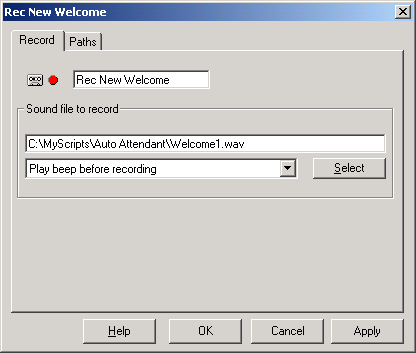
Recording will finish when any of the following occurs:
- silence is detected
- the caller hangs up
- a key that has a path defined for it is pressed
- a set timeout is reached
Following can be specified in the ‘Sound File to Record’ text box:
-
Full filename of the destination file
Recording will be made into the specified file. If a file with this name exists already then it will be overwritten. -
Just the directory into which the recordings are to be placed
A filename will be generated and the recording will be placed in the specified directory.
The directory name must finish with a “\” -
Leave the entry blank
A filename will be generated and the recording will be placed in the script’s directory
If the destination filename is not specified the file name generated will follow this template:
MMDDHHNNSS_LineId_Port_CallerID.wav
where:
MM : 2 digit month
DD : 2 digit day
HH : 2 digit hour
NN : 2 digit minute
SS : 2 digit second
LineId : LineId of line handling the call
CallerID : Caller's telephone number
Record Length
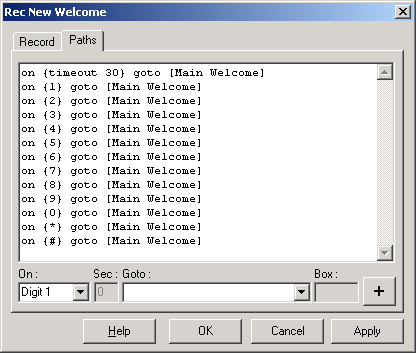
The Timeout path is used to specify the maximum length of recording.
eg: the screenshot below of the module's paths tab shows that that module a "timeout 30" path.
If recording length reaches 30 seconds then recording will be stopped and that path will be taken.
Also, if the caller presses any of the keys that have paths defined for it, the recording will terminate and the caller will be sent to the module specified in the path (in this case all paths lead back to the Main Welcome module.
Silence Detection
The recording will stop if silence is detected. The following type of path can be used to tell VoiceGuide which module to go to next if a silence is detected;
on {silence} goto [module title]
Minimum silence length and volume parameters can be set by editing the VG.INI configuration file, in section [PlayRecordConfig]. From VG.INI file:
;SilenceDetectLength: 40=4 seconds
SilenceDetectLength=40
;SilenceDetectLevel: range: 0-100
;0 - disable silence detection, 100 - detect loud background noise as silence
SilenceDetectLevel=10
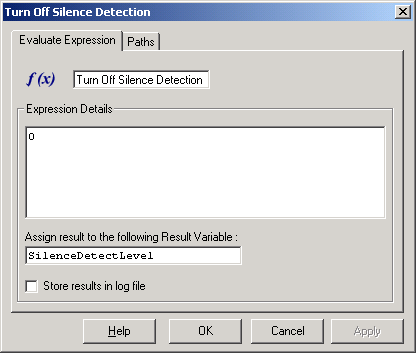
The silence detection settings can be set from within the script as well, by assigning values to Result Variables SilenceDetectLevel and SilenceDetectLength
This can be done using the Evaluate Expression module, or setting them in any other way that Result Variables can be set.
eg. To disable silence detection using the Evaluate Expression module:
Transcription
To have the recorded sound transcribed into text the Result Variable:
Transcribe_Record_Module
must be set to a value of: "True" or "1".
VoiceGuide will use a Speech-to-Text engine to transcribe the text.
The text will be saved in the same filename as the sound file, but with the ".WAV" suffix changed to ".TXT".
Event Transcribe_End will fire when the transcription completes.
Paths can be set to react to this event. eg:
on {Transcribe_End} goto [Process Transcribed Text]
Result Variables
| $RV[ModuleTitle] | Filename of the recorded sound file. Includes the full directory path. |
| $RV[ModuleTitle_EndRecCause] | Reason why recording was stopped. |
| $RV[ModuleTitle_RecLen100ms] | Length of Recording in 100ms units (eg. a value of 75 equals seven and a half seconds). |
| $RV[ModuleTitle_Transcribe_File] | Filename of the text file that holds the transcription. Includes the full directory path. |
| $RV[ModuleTitle_Transcribe_Text] | Transcription text. |
Call Recording - Recording Conversations
The Record_2Lines_Start function can be used to record both sides of the conversation.
Record_2Lines_Start supports recording of both sides of a bridged conference call.
Record_2Lines_Start also supports recording of both sides of the Caller<->IVR connection -
recording what IVR plays to the caller and the caller's responses.
