 Make Outbound Call Module
This module will make an outgoing call on another line to the phone number specified, and run the specified script or sound file when the call is answered.<
Note: More advanced call scheduling features can be accessed by loading the calls using the Dialer's 'Out Dial' XML file method, WCF/COM/REST interfaces, or inserting call data directly into the VoiceGuide database.
The Dialer option must be enabled to allow VoiceGuide to perform any outbound dialing.
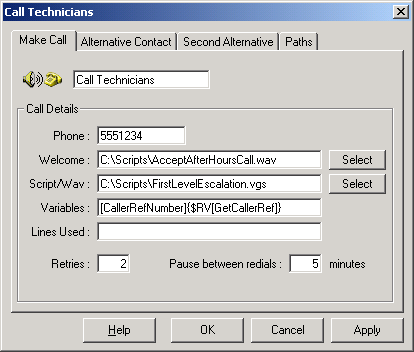
You can specify the telephone number to call, the welcome message to play when the call has been made, the VoiceGuide script to run once the call has been accepted, and custom Result Variables which can be used by the called script.
Result Variables can be used when specifying any of the entries in this module. <>
Phone
The phone number to dial.
Welcome
Optional. Prompt played to caller caller to accept the call. The welcome message asks the called person whether they want to accept the call or not. The called person should press '1' on their telephone keypad to indicate that they want to accept the call. Hence any welcome message should advise to 'Press 1' to accept the call'.
If the welcome message is not specified then the default VoiceGuide welcome message will be played. If welcome message is set to 'none' then no welcome message will be played and VoiceGuide will go directly to running the script.
Script
Which script will be ran once the call is accepted, or the sound file to be played.
Variables
Result Variables which can be accessed by the called script. Use these to pass any information (eg. callers contact details) to the script which will be used when the outbound call is made. The format of this field is [RvName]{RvValue}. Multiple Result variables can be specified by listing the name-value pairs as needed.
In the properties page screen capture above we see that the caller's problem reference number is being passed to the FirstLevelEscalation.vgs script. The reference number would have been generated previously in module CallerRef, and $RV[CallerRef] will be replaced with the actual reference number when the call is queued. The reference number can then be accessed using $RV[CallerRefNumber] in the FirstLevelEscalation.vgs script.
Lines Used
If the outbound call may only be made on particular phone lines then these lines should be listed here. Lines should be specified as a comma delimited list of "LineIDs" (eg: 6,7,8) or of the Dialogic line identifiers (eg: dxxxB1C2,dxxxB1C3). If any of the lines are allowed to to be used then this setting should be left blank.
Retries
The number times the number will be redialed before abandoning attempts to contact the number. For example, if the number of retries is set to 2, with 5 minutes between redials then the phone number will be called 3 times in total (1 call + 2 redials).
Escalation Dialing
In case VoiceGuide is unable to contact anybody at the first phone number supplied, alternative phone numbers and scripts can be specified. This is useful if:
- A person you want to contact can be under different numbers.
- Problem escalation situations, where if one person is unavailable then further people will be called until one of the people on the list answers the call.
Alternative Contact and Second Alternative Contact tabs are used to specify alternative contact numbers. Once the number of retries for one number is exhausted, the next alternative number will be dialed.
Notes:
For instructions on how to set your own escalation dialing without using the Make Call module, see the VoiceGuide Dialer section of this help file.
Paths
The 'Success' path is taken if the call was scheduled. If for any reason the call could not be scheduled, the 'Fail' path will be taken
Scheduling Calls
The Send Phone Message module schedules the call to be made immediately. If you need to schedule a call to be
made at a later time VoiceGuide's COM function Dialer_OutDialQueAdd needs to be used. This function can be called from within a Run VB Script module.
The future date/time needs to be specified in format "YMMDDHHNN" in
Dialer_OutDialQueAdd's lActivateTime
parameter.
eg. To specify a date/time exactly 3 days in future you can use the following VB
Script snippet:
dDate = DateAdd("d", 3, Now)
sYear = Right(Year(dDate), 1)
sCallTime = sYear * 100000000 + Month(dDate) * 1000000 + Day(dDate) * 10000 +
Hour(dDate) * 100 + Minute(dDate)
and then you use sCallTime when calling Dialer_OutDialQueAdd
You can hard code the hour and minute settings if you want the call to be made
at a certain time. eg to call at 10:30am the sCallTime formula would become:
sCallTime = sYear * 100000000 + Month(dDate) * 1000000 + Day(dDate) * 10000 + 1030
