Detecting End of Call
On systems using VoIP - SIP or T1/E1 ISDN end of call is detectable by:
- End of call message.
- Timeout awaiting input from caller.
- Sometimes Disconnect tones are played.
On systems using Traditional Analog Lines end of call is detectable by:
- Disconnect tone on the line.
- Loop Current Drop on the line.
- Special DTMF tone played by PBX/Switch.
- Timeout awaiting input from caller.
End of Call Message
VoIP and ISDN systems can use digital signalling to immediately indicate end of call when the other party hangs up the handset.This is the most reliable way of obtaining end of call indication, and is usually received immediately when remote party hangs up.
VoiceGuide will then end the script and hangup as well.
Note that some VoIP providers may not send the 'Disconnected'/'Bye' message.
Loop Current Drop
Loop current drop is used by some telephone companies and PBXs to indicate end of call.Dialogic cards can detect loop current drop and VoiceGuide will immediately hang up the call when loop current drop occurs.
Timeout awaiting input from caller
When there is no response (keypresses etc.) from the caller within a certain time then VoiceGuide will hangup the call(but if 'timeout' or 'fail' paths are defined in current module then those paths will be taken instead).
Disconnect Tone
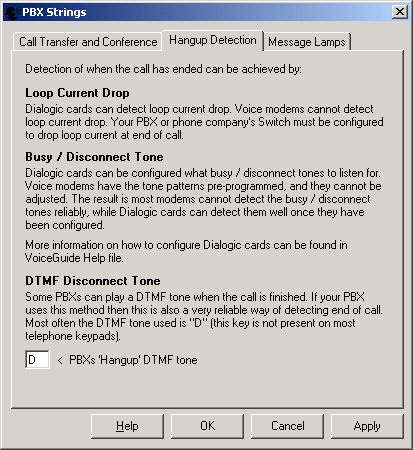
A tone is usually played on the line when the other party hangs up. This tone is known as a 'disconnect tone'.Some PBXs send a DTMF tone (usually tone "D") to indicate end of call.
Dialogic drivers come pre-programmed with sets tones that they will detect as 'end-of-call' tones, but can also be be configured for what disconnect tones to listen for.
Determining the Disconnect tone frequency and cadence :
To find out what disconnect tone is played by your telephone company when the other party hangs up you can use VoiceGuide's Record module.
Use a script with a Record module in it, and when the Record module starts recording just hang up.
The recording will now include what is heard by the system after the other party hangs up.
Then analyze the frequencies using any of the more advanced sound editors
eg: when using Audacity (https://www.audacityteam.org/) :
1. Open the file in Audacity
2. Highlight the section of the sound file where the tone is present (the "ON" part of the tone)
3. Go to "View" menu and select "Plot Spectrum"
4. Note at what frequency the peak(s) is/are.
5. Highlight the entire section when tone is ON and check the interval, looking at the selection's timing data at bottom of Audacity's window.
6. Highlight the entire section when tone is OFF and check the interval, looking at the selection's timing data at bottom of Audacity's window.
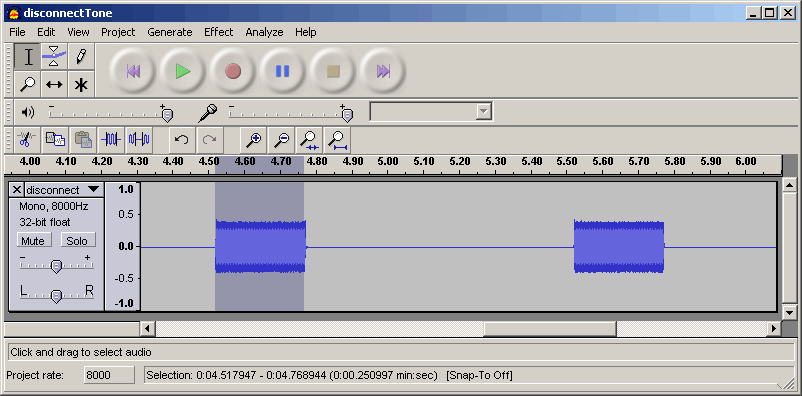
Screenshot below shows Audacity with a disconnect tone with the ON part of the disconnect tone highlighted.
The Selection interval timing is displayed at the bottom of the window - in this case the ON part of the tone lasts about 250milliseconds (0.250 seconds).
Below screenshot shows the Frequency analysis window which is shown when Audacity's "View"-> "Plot Spectrum" menu is selected.
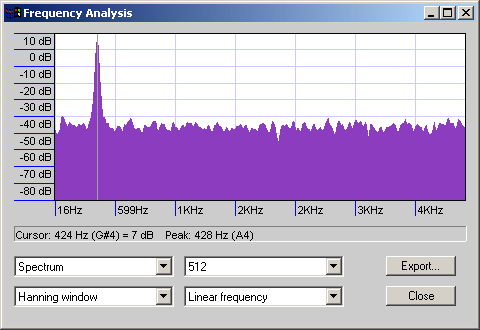
The peak is at 428Hz.
Screenshot below shows Audacity with a disconnect tone with the OFF part of the disconnect tone highlighted. The Selection interval timing is displayed at the bottom of the window - in this case the OFF part of the tone lasts about 750milliseconds (0.750 seconds).
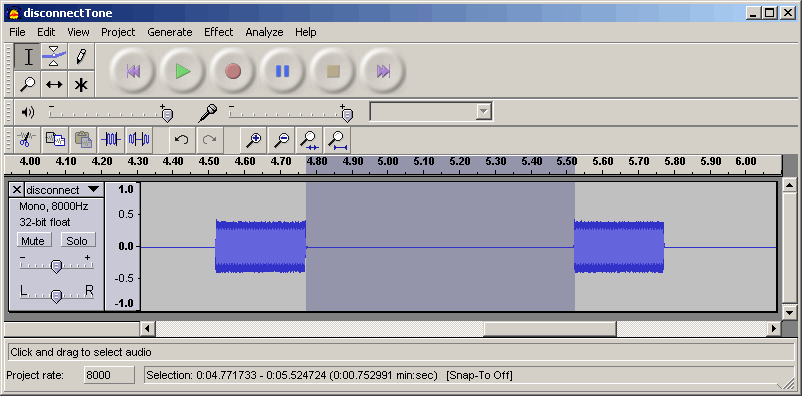
Based on the above information the disconnect tone in he example above is a single tone of 428Hz which lasts about 250ms and then a period of silence which lasts about 750ms.
The recommended settings for Dialogic cards to detect this tone reliably would be:
| Freq1: | 428 |
| Freq1 dev: | 40 |
| Freq2: | 0 |
| Freq2 dev: | 0 |
| On time: | 25 |
| On time dev: | 5 |
| Off time: | 75 |
| Off time dev: | 5 |
| Repetition count: | 3 |
When specifying the On/Off times (cadence times) for Dialogic the lengths of time are in units of 10milliseconds, so a value of 25 represents 250milliseconds.
For allowed variances (deviations) in frequency and time it's usually
appropriate to use about 10% of the value for variance.
For 'cadence' usually a value of 5 is OK (a value of 5 is 50 milliseconds).
If trying to detect a continuous tone which does not have ON/OFF cadence you should set the
"Repetition Count" to be 0 and the OFF time to 0 as well.
Setting tones in ConfigLine.xml :
The Disconnect tone must be set in ConfigLine.xml file which can be found in VoiceGuide's \data\ subdirectory.
The Tone definitions which should be edited is the DISCONNECT_USER_1 or DISCONNECT_USER_2 (DISCONNECT_TAPI1 or DISCONNECT_TAPI2 in VoiceGuide v6). The TID_DISCONNECT tone definition is only used on outbound calls, and it can also be changed if required.
An example entry in ConfigLine.xml:
<Tone Name="DISCONNECT USER 1">
Detection of DTMF disconnect tones : VoiceGuide is configured by default to react to DTMF key "D" as an indication of
disconnect. Selection of which DTMF tone should be used by VoiceGuide as a disconnection tone can be made in the [PBX] section of the VG.INI file.
In general Dialogic cards are pretty good at correctly detecting
disconnect tones and if the tones are defined with low tolerance bands then
the probability of false detections is low. If the tolerance bands however are
set widely, allowing a wide range of tones and/or frequencies then false
detections of disconnect tones can occur just while a person is speaking or a
sound file is being played. As disconnect tone detections will result in the
call being ended immediately it is imperative that the possibility of false
detections is as low as possible.
One of the situations where disconnect tone definition parameters need to be
set broadly is when a number of different disconnect tones needs to be detected.
To setup the system to detect a variety of tones it would be necessary to record
all the tones which you want the system needs to detect, analyze them with
Audacity to find out the frequencies and timings and then come up with the one
global setting which will be able to detect them all - keeping in mind that the
broader the tolerances the higher the chance of false busy detections. In
situations like these using T1/E1 ISDN lines would be a better solution.
NB. VoiceGuide allows for a different ConfigLine.xml file to be used for each
channel - so each channel can have it's own tone configurations. Use <ConfigLine>
tag within the <Channel> entry to specify the LinesConfig.xml file specific for
that channel. eg:
<Channel>
Some PBXs and Switches can be set up to play a DTMF tone on the line when
the PBX/Switch detects that the other party has hung up. The DTMF tone chosen to
indicate that is usually the "D" tone.
Most telephone handsets do not have the DTMF A, B, C and D tones on their
keypad, so the callers cannot generate these tones themselves.
If the PBX or Switch is capable of generating DTMF tone at end of call then
we highly recommend using this approach as it is a very reliable way of
informing VoiceGuide immediately when the call has finished.
The DTMF Disconnect Tone for which VoiceGuide will listen and use as an
indication of end of call can be set by selecting "PBX Command Strings" from the
"Edit" menu in VoiceGuide Script Designer:
<Notes>Disconnect Tone</Notes>
<ID>DISCONNECT_USER_1</ID>
<Freq1>428</Freq1>
<Freq1Dev>50</Freq1Dev>
<Freq2>0</Freq2>
<Freq2Dev>0</Freq2Dev>
<On>25</On>
<OnDev>5</OnDev>
<Off>75</Off>
<OffDev>5</OffDev>
<Count>3</Count>
</Tone>
DTMF Disconnect tones :
<Name>dxxxB1C1</Name>
<Protocol>pdk_na_an_io</Protocol>
<RingsBeforeAnswer>0</RingsBeforeAnswer>
<script>C:\Scripts\MyScript.vgs</Script>
<AllowDialOut>1</AllowDialOut>
<ConfigLine>C:\MyConfigs\ConfigForUsCalls.xml</ConfigLine>
</Channel>
End of Call Detection: Special DTMF tone played by PBX/Switch