Multi Language Systems
When implementing multi-language systems:
- Script prompts need to be recorded in multiple languages.
- If using any of VoiceGuide's pre-recorded system prompts, then a new set of system prompts needs to be recorded in the new language as well.
Script Sound Files
Usually towards the beginning of the script a module like this would be used:
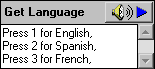
The user selection would then be available by using the $RV[Get Language] Result Variable.
This result variable can then be used to select the right language version of the file for the script to play.
eg: language files can be placed in separate directories:
C:\MyScripts\$RV[Get Language]\Intro.wav
Would be translated by VoiceGuide to either:
C:\MyScripts\1\Intro.wav
C:\MyScripts\2\Intro.wav
C:\MyScripts\3\Intro.wav
where the three files are recorded in English, Spanish and French respectively.
or, the sound files to play can be specified like this:
C:\MyScripts\Intro_$RV[Get Language].wav
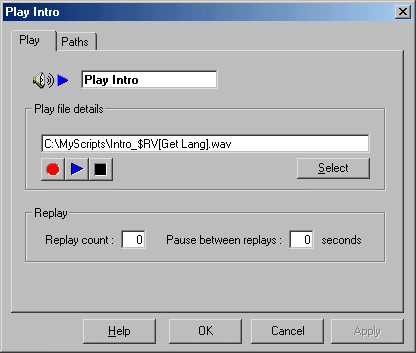
Above would be translated by VoiceGuide to indicate either:
C:\MyScripts\Intro_1.wav
C:\MyScripts\Intro_2.wav
C:\MyScripts\Intro_3.wav
VoiceGuide System Sound Files
VoiceGuide's default system sound files are stored in the VoiceGuide’s "\system\voice\" subdirectory.
To select a different set of system files to be used for the current call, the path pointing to the new system directory current for this call needs to be written to the $RV[DIRSYSTEMVOICE] Result Variable.
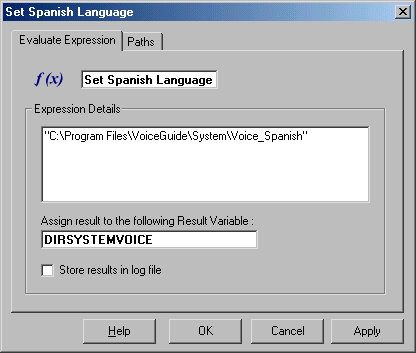
The path has to be written in double quotes. Note that only DIRSYSTEMVOICE is specified in the "Assign to Result Variable" text box, not $RV[DIRSYSTEMVOICE].
