Voicemail Manager
Using the Voicemail Manager you can browse through the voicemail boxes, and change any of their settings:
- create/remove voicemail boxes,
- play/delete/record messages left in individual voicemail boxes,
- play/delete/record the greeting messages for individual voicemail boxes.
- edit the forwarding email address for new voicemail messages
- edit the forwarding phone number for new voicemail messages
- edit the pager telephone number
- edit the message distribution lists.
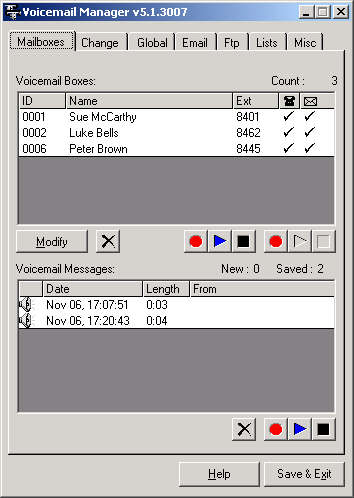
To add a new voicemail box select the 'Add/Modify' tab, and fill out the mailbox details and forwarding information.
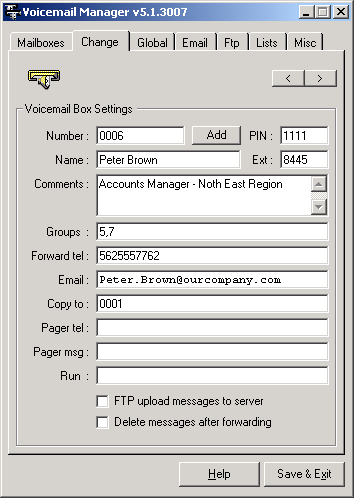
| Field | Description |
|
|
|
|
Number |
Voicemail box numbers (VMB IDs) can be up to 6 digits long, allowing up to 1,000,000 voicemail boxes on the system. In most applications 4 digit digit voicemail ID's are used, allowing up to 10,000 mailboxes. |
|
|
|
|
PIN |
Voicemail box access PIN number length is set to 4 digits. If no PIN is specified the caller will be asked to specify the PIN the first time they log into the voicemail box. |
|
|
|
|
Name |
Name of the voicemail box owner. This is the name which can be spelled by caller when using the Auto Attendant's 'spell name' feature. |
|
|
|
|
Ext |
Extension number associated with this voicemail box. This is the extension number to which caller will be transferred when using the Auto Attendant's 'spell name' feature. |
|
|
|
|
Comments |
Administrator's Comments. |
|
|
|
|
Groups |
Voicemail groups to which this mailbox belongs to. Voicemail groups are used when sending broadcast messages, and when browsing voicemail boxes' welcoming messages. |
|
|
|
|
Forward tel |
Any new messages will be forwarded to the phone number specified. VG Dialer option must be enabled to allow VoiceGuide to dial out and deliver any new voicemail messages. |
|
|
|
|
|
If a forwarding Email address is specified, all recorded messages for this mailbox will be sent by Email to the address specified. If the message needs to be sent to multiple email addresses the individual addresses must be separated by semicolons " |
|
|
|
| Copy To | What other Voicemail boxes any messages left in this voicemail box should be copied to. The list can include individual voicemail boxes or Distribution Lists. |
|
|
|
|
Pager tel |
The telephone number dialed to deliver a numeric pager message. VG Dialer option must be enabled to allow VoiceGuide to dial out and deliver any new voicemail messages. |
|
|
|
|
Pager msg |
The message sent to the pager. VoiceGuide will pause for a couple of seconds after dialing the telephone number and before dialing the message. If this pause is not long enough, extra wait time can be specified by tying commas at the beginning of the message. The example in the captured screen above has three commas. The length of a pause generated by each comma differs from system to system and its best to determine by trial and error the number of commas to use in order to have reliable pager message delivery from your VoiceGuide system to your pager provider. Also in the example above a Result Variable was used in the message. This shows how the caller's ID or any other data entered by the caller in another part of the script can be sent as part of a pager message. |
|
|
|
|
|
If a forwarding Email address is specified, all recorded messages for this mailbox will be sent by Email to the address specified. If the message needs to be sent to multiple email addresses the individual addresses must be separated by semicolons " |
|
|
|
| Run | What program to run after a message has been left for this voicemail box. This can be used to start 3rd party command line utilities to forward alerts to alphanumeric pagers, or to mobile phones via SMS. Another possible use is for post-processing of recorded message or forwarding of the recorded message through other means. (The filename of the just recorded message can be accessed using the $RV[VoicemailMesasgeXXXX] Result Variable - it returns the filename of the last recorded voicemail message in a particular voicemail box - which is specified by replacing XXXX with the number of the voicemail box.) |
|
|
|
Distribution Lists
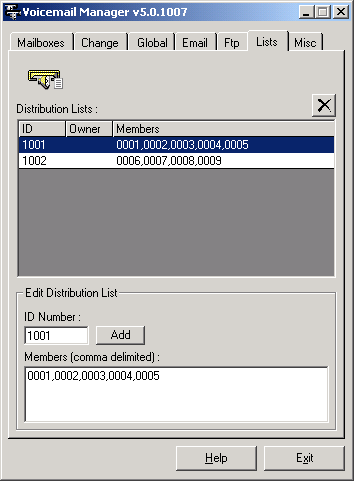
Messages recorded in the voicemail system can be sent to individual voicemail boxes or Distribution Lists. Distribution Lists are by default global and available for use to anyone. This screenshot shows how the Distribution Lists are defined:
Voicemail configuration file
The voicemail information
is stored in file VmBoxList.xmlin the Data subdirectory.
The Voicemailbox data is
stored in an XML format, allowing easy viewing and manipulation of this data by
users own tools.
Any changes made to the
Voicemail configuration file by the Voicemail Manager or by any other program
will also be loaded by VoiceGuide immediately after the new version of the file
is saved. This allows for outside programs to add and delete voicemail boxes at
will.
Email Forwarding
The Voicemail Manager allows you to define the standard template for the Subject and Body of the emails sent with forwarded recorded messages.
The Email's Subject and Body
can also be customized on a per voicemail box basis by creating
these test files in VG's \system\vm\ subdirectory:
\system\vm\EmailForwardTemplate_XXXX_subject.txt
\system\vm\EmailForwardTemplate_XXXX_body.txt
Where XXXX is to be replaced by the voicemail box number.
If the Voicemail-box specific files subject or body can be found then the following files will be used if they exist:
\system\vm\EmailForwardTemplate_subject.txt
\system\vm\EmailForwardTemplate_body.txt
RV's can be used within these template files as well.
The voicemail scripts can also be modified to append information to the message body - please examine the voicemail scripts to see how this is done.
Note
Voicemail Manager reads
the contents of the VmBoxList.xmlfile on start, and saves all the
information on exit - overwriting the previous VmBoxList.xml. This means that any changes made
to VmBoxList.xmlby voicemail users managing their
accounts (changing PINs or Forwarding numbers) by any other programs while the Voicemail Manager is open
will be lost.
Hence it is recommended that
Voicemail Manager only be used only at times when no callers are performing
administration functions on their Voicemail account.
The voicemail introduction
messages are stored by default in VG's \data\VmWelc\ subdirectory.
The messages left in voicemail boxes are stored by default in VG's \data\VmSave\
subdirectory.
