T1 ISDN and E1 ISDN
Installing and Starting Dialogic T1/E1 cards
Please refer to installation instructions supplied with your card, and contact the card supplier if you encounter any issues starting the Dialogic service.
Dialogic's "Quick Install Card" document has information on how the various switches on the Dialogic card need to be set at card installation time.
It is recommended that at working T1/E1 trunk is attached to the card's RJ48C port before starting the Dialogic service. Otherwise the Dialogic service may not start. A 'loopback' connector may often be used instead of the working T1/E1 trunk.
Note: RJ48C connectors look the same as RJ45 connectors, but the wiring is different. RJ48C wiring uses pins 1 and 2 for "Receive from Network" channel, and pins 4 and 5 for "Transmit to Network" channel.
Selecting ISDN Protocol
The appropriate ISDN protocol in the Dialogic Configuration Manager (DCM) system needs to be selected. After selecting the appropriate ISDN protocol, and starting the Dialogic service the system should now be able to receive calls. Screenshot below shows where in the DCM the ISDN protocol is set for a JCT card:
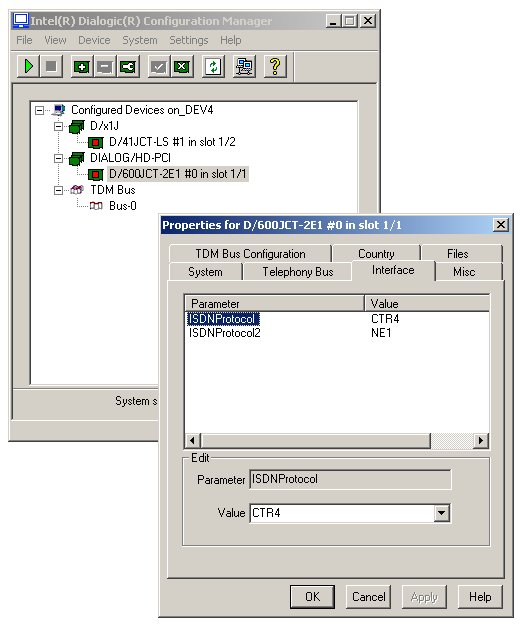
The telephone company or PBX/Switch administrators will advise which ISDN protocols are available on the trunks they supply.
It is recommend that calls are presented on the trunk(s) in a 'round robin'/'circular' order. This would result in the incoming calls being evenly distributed across all available channels.
Usually the Dialogic cards are expected to be set up in 'User' mode.
Below table shows what protocol selection should be made for Dialogic JCT series cards:
| T1 ISDN Protocol | Mode: User or Network | ISDN Protocol in JCT |
| QSIG-T1 | User | QTU |
| QSIG-T1 | Network | QTN |
| NI2 | User | NI2 |
| NI2 | Network | NT1 |
| 4ESS | User | 4ESS |
| 4ESS | Network | NT1 |
| 5ESS | User | 5ESS |
| 5ESS | Network | NT1 |
| DMS | User | DMS |
| DMS | Network | NT1 |
| E1 ISDN Protocol | Mode: User or Network | ISDN Protocol in JCT |
| NET5 (Euro-ISDN) | User | CTR4 |
| NET5 (Euro-ISDN) | Network | NE1 |
| QSIG-E1 | User | QTE |
| QSIG-E1 | Network | QNT |
Testing ISDN Line
The Dialogic ISDIAG.EXE application can be used to test the T1/E1 lines and obtain ISDN traces.
When using the "DMV" family cards. eg: DMV480, DMV600, etc. the Dialogic ISDNTRACE.EXE application can be used obtain ISDN traces.
Any ISDN traces captured can be converted into readable format using Dialogic's ISDTRACE.EXE utility.
ISDIAG
Dialogic provides the isdiag.exe command line application which will allow you to test if the ISDN connection is functioning and can capture the ISDN layer trace as well. Isdiag.exe will only work on 'Springware' Dialogic cards, ie. 'JCT' series cards. Isdiag.exe is located in directory C:\Program Files\Dialogic\bin
To test an E1 connection the isdiag.exe would usually be started like this at the DOS Command Prompt:
isdiag 1 1 e s v
To test a T1 connection the isdiag.exe would usually be started like this at the DOS command prompt:
isdiag 1 1 t s v
The examples above would allow user to receive and make calls on that first channel of first T1/E1
interface only. You will need to confirm with the Telco that they will send a call on that channel after the ISDN D channel is restarted.
ISDN's D channel is restarted when isdiag is restarted, or when Dialogic Service is restarted.
Screenshot below shows menu displayed when isdiag is started:
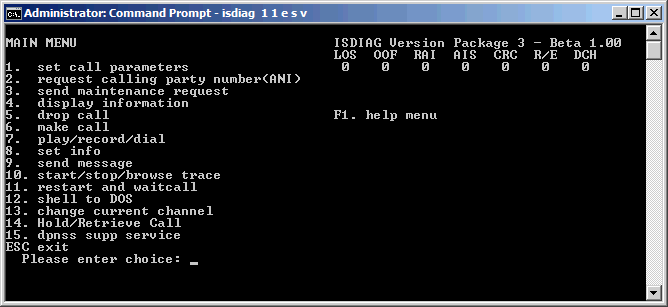
Isdiag displays current state of ISDN trunk at top right. All the error flags should be "0".
eg. if the number under DCH is "1" this indicates a D channel error (D channel not present).
VoiceGuide should not be started when using isdiag.exe, as isdiag.exe itself opens the channel on the ISDN trunk.
If you are unable to receive/make calls and play/record sound files with isdiag then you will need to contact your Dialogic supplier to establish why the hardware they provided does not work on your T1/E1 trunks. It is unlikely that VoiceGuide will work if isdiag cannot receive and make calls.
isdiag.exe can be used to capture traces of the ISDN messages as well. The log files produced by isdiag.exe need to be converted into human-readable form by using the isdtrace.exe application.
ISDNTRACE
Dialogic provides the ISDNTRACE.EXE application which can capture a trace of the ISDN messages. Isdntrace will only work on DM3/DMV type Dialogic cards. Isdntrace is located in Dialogic's \bin\ subdirectory.
The ISDN traces are used to confirm what ISDN parameters are sent by the Telco on that ISDN line, and to confirm what parameters are being sent out by VoiceGuide when an outbound call is made. The outgoing parameters should usually match what is sent by the Telco's switch.
To use isdntrace to obtain the trace of the ISDN layer messages please follow the following steps.
1. Stop VoiceGuide.
2. Restart Dialogic Service.
3. Start isdntrace using this command .
isdntrace -b0 -d1 -f c:\myisdnlog
4. Start VoiceGuide.
5. Make a call into VoiceGuide. Hangup after VoiceGuide answers.
6. Make a call out of VoiceGuide, loading the call using the "Outbound Call Loader".
7. After calls is ended press "q" in the isdntrace
Command Prompt window to exit isdntrace.
8. Trace file would be created in C:\, name of file begins with
"myisdnlog".
Configuring VoiceGuide
The channels which VoiceGuide is to use are specified in Config.xml file (see VoiceGuide's \conf\ subdirectory).
Sample Config.xml files are provided, and cover the most common deployment scenarios.
In the Config.xml file the Protocol just needs to be set to ISDN
It is recommended that all channels are opened: 23 on a T1 ISDN line, and 30 on an E1 ISDN line.
Some PBXs and Switches will not properly handle the calls unless all channels on the line are opened.
A sample ConfigLine.xml file for use with ISDN systems is also provided. Analog system related settings have been removed from that file, and ISDN related settings have been added in.
ISDN Outgoing Calls
Setting the ISDN protocol to the correct value is usually sufficient for outgoing calls to function as well. Some telephone companies however have specific non-standard requirements for outgoing calls.
This section outlines the configuration options available within VoiceGuide to allow the user to explicitly specify the individual settings on outgoing calls.
Most of these requirements relate to the structure and the information contained within the "Setup" message sent to the switch when a new call is made. VoiceGuide offers extensive control over the information sent within the Setup message, allowing easy configuration of the system to match requirements of the Telco switch or PBX.
The Setup message parameters are configurable using the ConfigLine.xml file, in section <ConfigLine><isdn><msgSetup>.
Below is an example of what this section looks like, with the default values set.
<msgSetup>
<defsrc>NONE</defsrc>
<defcc>
<cc_bc_xfer_cap>BEAR_CAP_SPEECH</cc_bc_xfer_cap>
<cc_bc_xfer_mode>ISDN_ITM_CIRCUIT</cc_bc_xfer_mode>
<cc_bc_xfer_rate>BEAR_RATE_64KBPS</cc_bc_xfer_rate>
<cc_usrinfo_layer1_protocol>ISDN_UIL1_G711ULAW</cc_usrinfo_layer1_protocol>
<cc_usr_rate>ISDN_NOTUSED</cc_usr_rate>
<cc_destination_number_type>NAT_NUMBER</cc_destination_number_type>
<cc_destination_number_plan>UNKNOWN_NUMB_PLAN</cc_destination_number_plan>
<cc_destination_sub_number_type>OSI_SUB_ADDR</cc_destination_sub_number_type>
<cc_origination_number_type>NAT_NUMBER</cc_origination_number_type>
<cc_origination_number_plan>UNKNOWN_NUMB_PLAN</cc_origination_number_plan>
<cc_origination_phone_number></cc_origination_phone_number>
<cc_origination_sub_number_type>OSI_SUB_ADDR</cc_origination_sub_number_type>
<cc_origination_sub_phone_number></cc_origination_sub_phone_number>
<cc_facility_feature_service>ISDN_NOTUSED</cc_facility_feature_service>
<cc_facility_coding_value>ISDN_NOTUSED</cc_facility_coding_value>
</defcc>
<defgc>
<gc_destination_address></gc_destination_address>
<gc_destination_address_type>NAT</gc_destination_address_type>
<gc_destination_address_plan>UNKNOWN</gc_destination_address_plan>
<gc_destination_sub_address></gc_destination_sub_address>
<gc_destination_sub_address_type>UNKNOWN</gc_destination_sub_address_type>
<gc_destination_sub_address_plan>UNKNOWN</gc_destination_sub_address_plan>
<gc_origination_address></gc_origination_address>
<gc_origination_address_type></gc_origination_address_type>
<gc_origination_address_plan></gc_origination_address_plan>
<gc_origination_sub_address></gc_origination_sub_address>
<gc_origination_sub_address_type></gc_origination_sub_address_type>
<gc_origination_sub_address_plan></gc_origination_sub_address_plan>
<gc_chan_info_medium_id>1</gc_chan_info_medium_id>
<gc_chan_info_medium_sel>MEDIUM_PREF</gc_chan_info_medium_sel>
<gc_call_info_category>SUB_NOPRIOR</gc_call_info_category>
<gc_call_info_address_info>ENBLOC</gc_call_info_address_info>
<gc_ext_data></gc_ext_data>
</defgc>
</msgSetup>
</isdn>
The <defsrc> setting selects whether the "CC"
or "GC" approach (or neither) will be used to configure Setup message.
Both approaches set almost the same information, but some Dialogic cards require the use of CC approach and some require the GC approach,
which is why the option to use one or the other is offered. Setting the <defsrc> filed to NONE should always be tried first.
This will result in the default settings for the selected ISDN protocol being used - the protocol set in Dialogic's Configuration Manager (DCM).
The DM3/DMV series cards can only use the "GC" setting parameters.
Settings used for individual fields within the <ConfigLine><isdn><msgSetup> section are detailed below:
Valid Settings
| Field | Values |
|
|
|
| defsrc | CC, GC, NONE |
|
|
|
| cc_bc_xfer_cap | BEAR_CAP_SPEECH, BEAR_CAP_UNREST_DIG, BEAR_REST_DIG |
|
|
|
| cc_bc_xfer_mode | ISDN_ITM_CIRCUIT |
|
|
|
| cc_bc_xfer_rate | BEAR_RATE_64KBPS, BEAR_RATE_128KBPS, BEAR_RATE_384KBPS, BEAR_RATE_1536KBPS, BEAR_RATE_1920KBPS, PACKET_TRANSFER_MODE |
|
|
|
| cc_usrinfo_layer1_protocol | SDN_UIL1_CCITTV.110, ISDN_UIL1_G711ULAW, ISDN_UIL1_G711ALAW, ISDN_UIL1_G711ADPCM, ISDN_UIL1_G722G725, ISDN_UIL1_H261, ISDN_UIL1_NONCCITT, ISDN_UIL1_CCITTV120, ISDN_UIL1_CCITTX31 |
|
|
|
| cc_usr_rate | ISDN_UR_EINI460, ISDN_UR_56000, ISDN_UR_64000, ISDN_UR_134, ISDN_UR_12000 |
|
|
|
| cc_destination_number_type | EN_BLOC_NUMBER, INTL_NUMBER, NAT_NUMBER, LOC_NUMBER, OVERLAP_NUMBER |
|
|
|
| cc_destination_number_plan | UNKNOWN_NUMB_PLAN, ISDN_NUMB_PLAN, TELEPHONY_NUMB_PLAN, PRIVATE_NUMB_PLAN |
|
|
|
| cc_destination_sub_number_type | OSI_SUB_ADDR, USER_SPECIFIED_SUB_ADDR, IA_5_FORMAT |
|
|
|
| cc_origination_number_type | EN_BLOC_NUMBER, INTL_NUMBER, NAT_NUMBER, LOC_NUMBER, OVERLAP_NUMBER |
|
|
|
| cc_origination_number_plan | UNKNOWN_NUMB_PLAN, ISDN_NUMB_PLAN, TELEPHONY_NUMB_PLAN, PRIVATE_NUMB_PLAN |
|
|
|
| cc_origination_phone_number | Default CallerID phone number for outgoing calls made using this channel can be specified here. |
|
|
|
| cc_origination_sub_number_type | OSI_SUB_ADDR, USER_SPECIFIED_SUB_ADDR, IA_5_FORMAT |
|
|
|
| cc_origination_sub_phone_number | Default CallerID phone sub-number for outgoing calls made using this channel can be specified here |
|
|
|
| cc_facility_feature_service | ISDN_NOTUSED, ISDN_FEATURE, ISDN_SERVICE |
|
|
|
| cc_facility_coding_value | ISDN_CPN_PREF, ISDN_SDN, ISDN_BN_PREF, ISDN_ACCUNET, ISDN_LONG_DIS, ISDN_INT_800, ISDN_CA_TSC, ISDN_ATT_MULTIQ |
|
|
|
| gc_destination_address_type | TRANSPARENT, NAT, INTL, LOC, IP, URL, DOMAIN, EMAIL |
|
|
|
| gc_destination_address_plan | UNKNOWN, ISDN, TELEPHONY, PRIVATE |
|
|
|
| gc_destination_sub_address_type | UNKNOWN, OSI, USER, IA5 |
|
|
|
| gc_destination_sub_address_plan | UNKNOWN |
|
|
|
| gc_origination_address | Default CallerID phone number for outgoing calls made using this channel can be specified here. |
|
|
|
| gc_origination_address_type | TRANSPARENT, NAT, INTL, LOC, IP, URL, DOMAIN, EMAIL |
|
|
|
| gc_origination_address_plan | UNKNOWN, ISDN, TELEPHONY, PRIVATE |
|
|
|
| gc_origination_sub_address | Default CallerID phone sub-number for outgoing calls made using this channel can be specified here. |
|
|
|
| gc_origination_sub_address_type | UNKNOWN, OSI, USER, IA5 |
|
|
|
| gc_origination_sub_address_plan | UNKNOWN |
|
|
|
| gc_chan_info_medium_id | Specifies the timeslot to be connected. |
|
|
|
| gc_chan_info_medium_sel | MEDIUM_PREF, MEDIUM_EXCL |
|
|
|
| gc_call_info_category | SUB_NOPRIOR, SUB_PRIOR, MAINT_EQUIP, COIN_BOX, OPERATOR, DATA, CPTP, SPECIAL, MOBILE, VPN |
|
|
|
| gc_call_info_address_info | ENBLOC, OVERLAP |
|
|
|
VoiceGuide ISDN Tracing
VoiceGuide can also initiate a trace the ISDN D-channel messages.
A file titled ktTelControl_TraceSelect.txt needs to be placed in "C:\" with the contents of the file indicating which Dialogic's board D-channel is to be traced.
Example contents should be:
isdn_trace_dtiB1
which indicates which interface board should have it's D-channel traced.
VoiceGuide will create the traces in "C:\", with the trace files named in this format: isdn_trace_dtiB1_0325_203334.log
Traces can be converted into readable format using Dialogic's ISDTRACE.EXE utility.
