Voicemail Introduction
VoiceGuide has a built in a fully-featured voicemail system, and can support an unlimited number of voicemail boxes.
Voicemail Features:
- Auto-attendant system allowing spelling of user's names and diverting to voicemail if extension is not answered.
- Each mailbox can have a personalized greeting message, which can be changed remotely.
- Each mailbox can have a personalized name/description, which can be changed remotely.,
- Voicemail messages can be retrieved remotely.
- Messages can be forwarded to other voicemail boxes and/or broadcast groups automatically, or as specified by listener of message.
- Messages can be be forwarded to an email address automatically as an attached Wave file.
- Messages can be be forwarded to another phone number automatically. The forwarding telephone number can be changed remotely by the voicemail box owner.
- Messages can be uploaded by FTP to selected FTP server.
- Voicemail box owners can change their PIN number remotely.
- Broadcast Groups, allowing the sending of broadcast messages to selected groups of people.
- Message Lamp for the extension associated with the mailbox is turned ON when new messages arrive and OFF when messages are listened to.
- All Voicemail system details stored in XML format, allowing easy integration with other systems.
Voicemail boxes have to first be created before they can be used. The Voicemail Manager tool is used to create and manage the voicemail boxes.
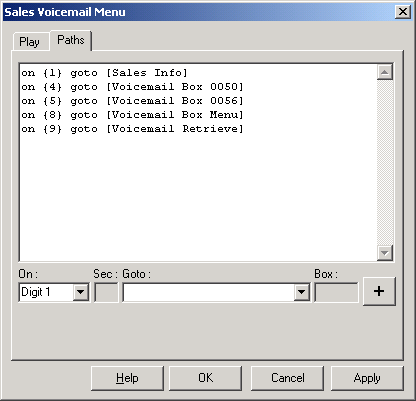
The voicemail boxes and menus can be accessed from any module. Paths can be specified to go to:
- A particular voicemail box,
- Menu which will ask the caller to enter the Voicemail box for which they want to leave a message,
- Retrieve Menu where the caller will be asked their voicemail box number and voicemail PIN before being able to retrieve messages.
- Auto Attendant which allows callers to spell the name of the voicemail box owner, and will then transfer the call to related extension (if defined), and if extension does not answer will divert call to related voicemail box.
An example below shows how the paths can be defined:
You can indicate to which module in the script the caller is to return to after leaving the voicemail system by appending Return [module title] after the path specification. The Return option will need to be typed in by hand. eg:
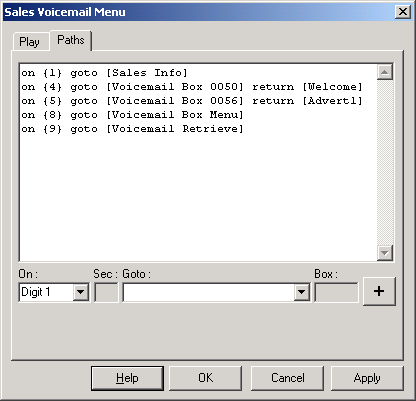
Once the caller has finished recording and/or retrieving messages and presses '0' to exit from the voicemail system, the script will then go to the module specified in the Return option. See here for more information on the Return option.
Modifying the Voicemail System
The Voicemail system is written as a set of VoiceGuide scripts located in VoiceGuide's \system\vm\ directory. These scripts can be edited giving the user full control and freedom over any modifications and extensions which may be required of the voicemail system.
Only the Enterprise (and Evaluation) versions of VoiceGuide use the modifiable scripted version of the voicemail - ie: the .vgs scripts in the \system\vm\ directory.
The Standard and Professional versions of VoiceGuide use the non-modifiable version of the voicemail system.