Outbound IVR
VoiceGuide can dial out and play messages or run a VoiceGuide IVR script once the call has been answered.
Outgoing calls can be scheduled using any of these methods:
- Call Loader app
- Send Phone Message module in a VoiceGuide script.
- Using VoiceGuide WCF/COM interface function Dialer_OutDialQueAdd.
- Saving list of numbers to be called in an Out Dial File, which VoiceGuide reads in automatically.
- Adding dial entries directly into the VoiceGuide OutDial Database.
VoiceGuide can detect whether a real person or an answering machine has answered the call.
Different messages or scripts can be specified in either case.
When an answering machine answers the call the message or script will start after the welcoming message stops playing.
Call Loader
Here is a screenshot of the Call Loader application, with some telephone numbers to call entered:
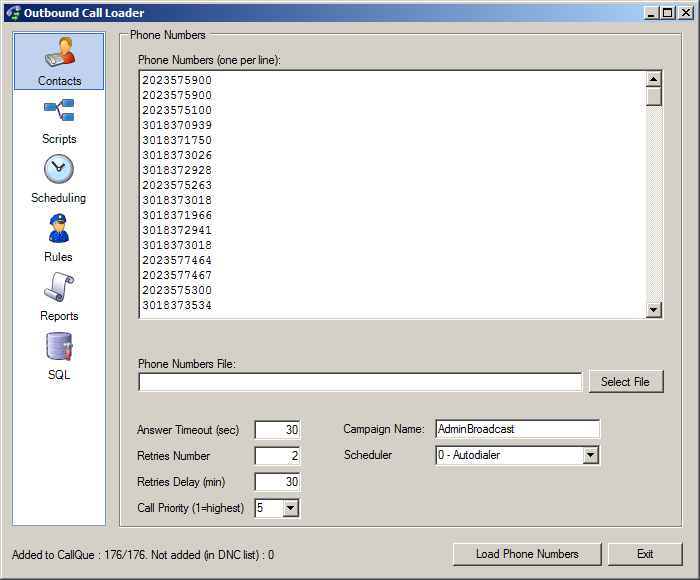
Phone numbers
The telephone numbers to be dialed can be typed directly into this text box. The numbers should be entered one per line. eg:
2125551111
2125552222
2125553333
A range of numbers can be specified by using "X" in the number to be dialed.
eg: 4155557XXX results in one thousand telephone numbers to be called: 415-555-7000 to 415-555-7999
Optionally, additional information like Name and other Data can be attached to each phone number, using the pipe: '|' or "Tab" characters to separate the fields. Like this:
Number|Name|Data1|Data2
Number Name Data1 Data2
eg:
2125551234|Bob Brown
2125551234|Bob Brown|6549148|Reminder1
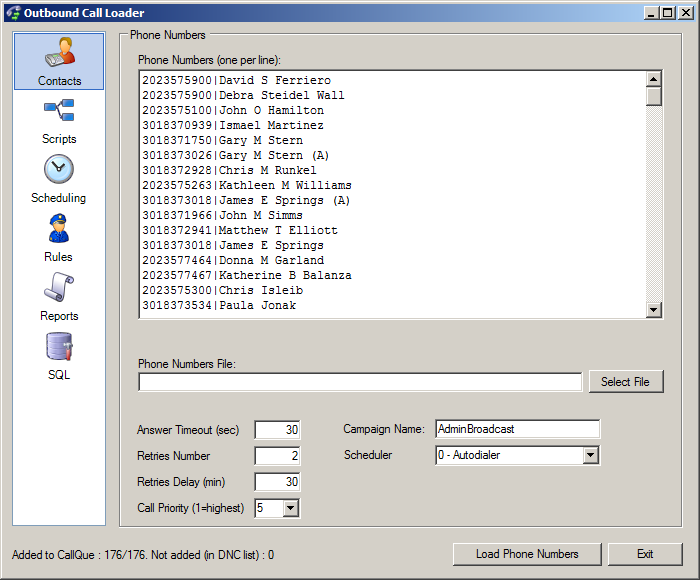
The data attached to each number is accessible within the ran scripts using $RV_CALLTRACK_* Result Variables.
Other information can also be attached to outgoing calls batch/campaign by setting the 'Result Variables' for those calls. See the 'Scripts' tab, 'Script Data' section.
Phone Numbers File
Allows to select the text file from which to import the list of numbers to call. The file should contain each number on its own new line.The "X" notation is still supported when loading numbers from a file. eg: entry 21255588XX would result in one hundred numbers being called: 212-555-8800 to 212-555-8899
Live Person Answer
VoiceGuide script to be started or sound file top be played when the call is answered by a real person.Specifying the starting module can be made using notation: Script Filename|Module Title
Answering Machine Answer
When the call is answered by an answering machine or voicemail system, VoiceGuide will play this message/script.If an answering machine is detected VoiceGuide will wait until the answering machine's welcome message finishes before starting the script/sound file specified here.
If the "Answering Machine" message option is not set then VoiceGuide will play the "Live person answer" script in cases where answering amchine is detected.
The "Answering Machine" option can also be set to:
| RETRY | VoiceGuide will hangup if an answering machine is encountered. Call will be attempted again later - up to the maximum number of redials allowed. |
| IGNORE | The script/file specified when the live person answers will be used. |
| DISABLE | Answering Machine detection is disabled. VoiceGuide will start the "Live Person Answer" script immediately when call is picked up. |
If T1/E1 ISDN or VoIP is used, the telephone company usually also advises immediately when the call is connected, ie: when the 'handset is picked up', before the person or machine answering call even trasnmits any sound on the line.
So on T1/E1 ISDN and VoIP systems if the "Answering Machine" message option is not set (or set to 'DISABLE') then VoiceGuide will play the "Live person answer" script immediately when then handset is picked up.
Answering Machine detection relies on listening to the first one or two words spoken by the person/device answering the call.
Decision is based on whether the first one or two words sounded like they were spoken by a live person, or by an answering machine.
This means that VoiceGuide waits until it hears the first one or two words being spoken before it can decide whether a live person or a machine answered the call.
Call Options
The Options field can be used for other special settings. Eg. to specify the outgoing CallerID used for the call. Including this setting: <CallerId>5551234</CallerId> would result in CallerId to be set to 5551234 on outgoing calls (lines used must support the setting of outgoing CallerID).
NOTE: Some SIP services require that the CallerID be set to the account number, to let their systems identify what account is making the outgoing call.
eg: <CallerId>9905234421234323@sip.skype.com</CallerId>
Fax to Send
If a fax is specified then VoiceGuide will send the specified fax on this call. This can be a .PDF or a .TIFF file. Note that when this field is specified VoiceGuide will start playing the Fax Calling Tone immediately after the number is dialed and only a fax send will be attempted during the call.Do Not Call List (DNC List)
File containing a list of telephone numbers which will never be called by VoiceGuide, even if they were inadvertently specified in the "Phone numbers to be called" file or text box. The file must contain each number on a separate line.
Result Variables
Result Variables can be attached to the call, and can then be used by the scripts which run when outgoing call is answered.The format of this field is [RvName]{RvValue}. Multiple Result Variables can be specified by listing as many name-value pairs as needed. eg: [rv1]{val1}[rv2]{val2}[rv3]{val3}
This allows any custom information/settings to be linked to, and used by, the outgoing calls.
Others
There are many other options that can be set using the Call Loader app:Time Scheduling, Port Selection, Priority Level, actions to take when NotAnswered or RetriesExhausted events occur, Call Headers and CallerID etc.
Call Escalations
Escalation calls need to be set using the Out Dial File method
Result Files
In addition to CDR Logs, Database Logs and Script Logs, outcome of all outgoing calls is saved in VoiceGuide's \data\ subdirectory.
OutDial_Contacted_Human.txt
List of calls answered by a real person.
OutDial_Contacted_AM.txt
List of calls answered by an answering machine.
OutDial_Contacted_Fax.txt
List of calls answered by a fax machine person.
OutDial_Uncontactable_NoAnswer.txt
List of calls which were not answered and rung out awaiting answer.
OutDial_Uncontactable_Busy.txt
List of calls which were not answered as the busy tone was heard.
OutDial_Uncontactable_OnDontDialList.txt
List of calls which were not made as the telephone number was on the supplied "Do Not Call list".
OutDial_Uncontactable_NoDialer.txt
List of calls which were not dialed as the Dialer option is not enabled.
OutDial_SIT_Reorder.txt
List of calls for which the Special Information Tone (Reorder) was played by the phone company.
OutDial_SIT_NoCircuit.txt
List of calls for which the Special Information Tone (No Circuit) was played by the phone company.
OutDial_SIT_CustIrReg.txt
List of calls for which the Special Information Tone (CustIrReg) was played by the phone company.
OutDial_SIT_Unknown.txt
List of calls for which an unknown Special Information Tone was played by the phone company.
Out Dial File
An 'OutDial' file can also be used to load the outbound calls to be made by VoiceGuide. When the file is created, VoiceGuide will read in the file and delete it after reading it's contents.
‘OutDial’ file can be created in VoiceGuide's \data\ subdirectory, or in directory specified in VG.INI, section [VGDialer], entry: OutDialFilePath
The filename must begin with "OutDial" and have the ".xml" suffix.
Multiple 'OutDial' files can be created at the same time, and will be read in by VoiceGuide within about a second of them being created.
All outdial files created within less then a few seconds of each other should have unique names - to avoid the possibility of a file being
overwritten by newer version while it is still being read in by VoiceGuide.
It is advisable to first create the file under a different name - that does not have the 'OutDial' prefix in its filename,
and after the file writing/copying is completed then rename the file to the OutDial*.xml format.
This would ensure that VoiceGuide would not attempt to open the file while it's contents are still being written to by another process.
<OutDialEntry> Where:
sPhoneNumber
Phone number to be dialed.
sPhoneNumberPrefix
Prefix to the phone number to be dialed. Prepended to the phone number before dialing.
sActivateTime
Time the call is to be made.
Format is YYYY-MM-DD HH:NN:SS sDayTimeStart
Time of the day from which this number can be dialed.
Format is: HHNN and
the time is specified in 24-hour format. eg: 0800
would mean: this number may be called after 8am.
If this setting is blank or is omitted then the call will be allowed to be
made from midnight onwards.
sDayTimeStop
Time of the day after which this number can no longer be dialed. Format is:
HHNN and the time is specified in 24-hour format. sDaysCallAllowed
On which days of the week can this number be dialed.
Format is : [Mo][Tu][We][Th][Fr][Sa][Su] eg:
MoWe would mean: this number may only be called on Mondays and Wednesdays.
If this setting is blank or is omitted then the call will be allowed to be made on every day of the week.
sPortSelection
If the outbound call may only be made on particular phone lines then the ports to which those lines are
attached should be listed in this setting.
The ports should be specified as a comma delimited list of physical ports (eg:
1,2,3).
If any of the lines are allowed to be used then this setting should
be left blank. sCampaignName
User defined name campaign name associated with this call.
Used to assist in segregating of outgoing calls based on their porpoise or source etc.
iPriority
At what priority level the calls should be made.
A lower number indicates a higher priority.
ie: 1 is the highest priority, then 2 etc etc.
Number of priority levels is unlimited.
sOnAnswerLive
VoiceGuide
script or sound file which will be used when the call is answered by a real
person The full path to this script or sound file must be specified.
Specifying the starting module can be made using notation: Script Filename|Module Title
sOnAnswerMachine
VoiceGuide script or sound file which will be used when the call is answered by an answering machine.
The full path to this sound file or script must be specified.
If this setting is blank or is omitted then the sOnAnswerLive
setting will be used.
sOnAnswerFax
Fax to send. This can be a .PDF or a .TIFF file.
Note that when this field is specified VoiceGuide will start playing the Fax Calling Tone immediately after the number is dialed.
The OnAnswerLive and OnAnswerMachine will be ignored, as only a fax send will be attempted during the call.
sOnNotAnswered
VBScript or .EXE/.COM/.BAT/etc. to run when the outgoing call has not been answered.
sOnRetriesExhausted
VBScript or .EXE/.COM/.BAT/etc. to run when the outgoing call has not been answered
and there are no more retries left.
This command is ran in addition to the OnNotAnswered
command.
iAnswerTimeout
How many seconds VoiceGuide will wait for the call to be answered.
If this setting is blank or is omitted then the answer timeout will be set to 60 seconds.
iRetriesLeft
How many times VoiceGuide will re-dial the phone number, before abandoning trying
to contact this number. If iRetriesLeft is set to 0 then only one call will be made.
If this setting is blank or is omitted then a value of 2 will be used. (ie: up to 3 call attempts in total)
iRetriesDelay
How many minutes VoiceGuide will wait between successive attempts
(if iCallRetries is set to 1 or more).
If this setting is blank or is omitted then a value of 5 will be used.
strRV
List of custom Result Variables which can be used by the VoiceGuide script above. The
format of this field is [RvName]{RvValue}.
Multiple Result variables can be specified by listing as many name-value pairs as needed.
eg: [rv1]{val1}[rv2]{val2}[rv3]{val3}
sCallOptions
Used for the specifying of custom call options. eg. CallerID to be sent.
sEscalation
Alternate numbers to be dialed if the call has not been answered.
Once the number of retries calling sPhoneNumber
is exhausted, then then alternative escalation number will be dialed immediately.
Format is in <OutDialEntry>...</OutDialEntry> structure format -
this allows for multiple escalations to be specified, each with its own custom settings.
Example 1 : Simple message delivery to a single number.
Scenario: Call telephone number 5553423, and run script d:\scripts\alarm.vgs
when call is answered. Call is to be made immediately. The OutDial file should contain:
<OutDialEntry>
If the call is not answered then the number
will be called up to two more times at 5 minute intervals.
Example 2 : Scheduling a call for a particular time.
Scenario: Call telephone number 5553328 at 6:30 in the morning on 12th June 2018 and
run the script d:\scripts\todays_specials.vgs
- passing to the script Result Variables which that script uses (in this case it
will be pricing of the items on special for this customer).
If an Answering Machine answers then run a modified version of the script which just plays the
prices and leaves contact details (d:\scripts\todays_specials_AM.vgs).
The OutDial file should contain:
Eg: OutDial_080521175323a.xml
Out Dial File Syntax
The syntax of the OutDial file as used by VoiceGuide v7 is:
<PhoneNumber>sPhoneNumber</PhoneNumber>
<PhoneNumberPrefix>sPhoneNumberPrefix</PhoneNumberPrefix>
<ActivateTime>sCallTime</ActivateTime>
<DayTimeStart>sDayTimeStart</DayTimeStart>
<DayTimeStop>sDayTimeStop</DayTimeStop>
<DaysCallAllowed>sDaysCallAllowed</DaysCallAllowed>
<PortSelection>sPortSelection</PortSelection>
<CampaignName>sCampaignName</CampaignName>
<Priority>iPriority</Priority>
<OnAnswerLive>sOnAnswerLive</OnAnswerLive>
<OnAnswerMachine>sOnAnswerMachine</OnAnswerMachine>
<OnAnswerFax>sOnAnswerFax</OnAnswerFax>
<OnNotAnswered>sOnNotAnswered</OnNotAnswered>
<OnRetriesExhausted>sOnRetriesExhausted</OnRetriesExhausted>
<AnswerTimeout>iAnswerTimeout</AnswerTimeout>
<RetriesLeft>iRetriesLeft</RetriesLeft>
<RetriesDelay>iRetriesDelay</RetriesDelay>
<RV>sRV</RV>
<CallOptions>sCallOptions</CallOptions>
<Escalation>
sEscalation
</Escalation>
</OutDialEntry>
If this setting is blank or is omitted then the call will commence immediately.
Format may also be: Now+X where X
is the number of minutes from the current time that the call should be scheduled for.
eg: 2100 would mean: do not dial this number after 9pm.
If this setting is blank or is omitted then the call will be allowed to be
made right up to midnight.
eg: 3,4,5
would indicate that the outgoing call can only be made on third, fourth or fifth port.
If the word none is specified,
then no file will be played and the call will be hung up.
The call will still be considered as having been completed.
If the word retry is specified, then the no file will be played and the
call will be hung up, and dialed again at a later time (up to the maximum number of retries).
 Any simple message / script delivery.
<PhoneNumber>5553423</PhoneNumber>
<OnAnswerLive>d:\scripts\alarm.vgs</OnAnswerLive>
</OutDialEntry>
Wake up calls.
Appointment reminder service.
Any announcements which need to be sent out at a particular time.
<OutDialEntry>
<PhoneNumber>5553328</PhoneNumber>
<ActivateTime>2018-06-12
06:30:00</ActivateTime>
<OnAnswerLive>d:\scripts\todays_specials.vgs</OnAnswerLive>
<OnAnswerMachine>d:\scripts\todays_specials_AM.vgs</OnAnswerMachine>
<RV>[ClientID]{123456}[PriceWidget]{125}[PriceDelivery]{7.50}
</RV>
</OutDialEntry>
Example 3 : Ensuring call is made during particular days/hours.
Surveys.
Distributing information to a large client base.
Whenever making a large number of calls and need to ensure that calls are only made between the hours allowed.
Scenario: Call the telephone number 5553328 at between 10am and 6pm on any weekday,
and run script d:\scripts\paymentoverdue.vgs
- passing to the script Result Variables which that script uses (in this case
the customer ID and the amount owing). If an Answering
Machine answers then run a modified version of the script which just plays the
amount owing and leaves contact details (d:\scripts\paymentoverdue_AM.vgs).
The OutDial file should contain:
<OutDialEntry>
Specifying the days on which calls can be made and the time range during which the call can be made is
useful if a large number of calls are queued and there is a need to ensure that
the system will not make the calls on odd days or hours.
When specifying a large number of calls it is usually easier to use the
Telephone Number Loader program, or loading the calls directly into the database.
Example 4 : Escalated Calls
Scenario 1: Call the number 5551111 immediately and run the script d:\scripts\alert.vgs
- passing to the script Result Variables which that script uses (in this case it
will be information on a problem reported by customer). If the number does not
answer then wait 5 minutes and try calling it again. If after 3rd call attempt
the number still does not answer then try calling 5552222 - again calling up to
3 times at 5 minute intervals.
If an answering machine answers the call then start the d:\scripts\alert.vgs
script as well (script should be designed to just play the information to
caller). If on 3rd call attempt the second number still
does not answer then run a VB Script d:\scripts\notanswered.vbs
The OutDial file should contain:
<OutDialEntry>
Scenario 2: Message Delivery to a Live Person only :
The OutDial file should contain:
<OutDialEntry>
The above script will result in the numbers being called in the following order : 5551111, then if no answer dial 5552222, and if no answer then dial 5553333,
then wait for 10 minutes, and repeat calling 5551111 then 5552222 then 5553333. Dialing of further numbers would stop as soon as one of the calls is answered.
<PhoneNumber>5553328</PhoneNumber>
<DayTimeStart>1000</DayTimeStart>
<DayTimeStop>1800</DayTimeStop>
<DaysCallAllowed>MoTuWeThFr</DaysCallAllowed>
<OnAnswerLive>d:\scripts\paymentoverdue.vgs</OnAnswerLive>
<OnAnswerMachine>d:\scripts\paymentoverdue_AM.vgs</OnAnswerMachine>
<RV>[ClientID]{4453566}[AmountOwing]{14325}</RV>
</OutDialEntry>
Delivering information to on-call staff, with supervisor escalation if calls by main staff not answered.
Follow-me message delivery - where a number of possible contact numbers is given.
Whenever a message needs to be delivered to one of a range of telephone numbers.
<PhoneNumber>5551111</PhoneNumber>
<OnAnswerLive>d:\scripts\alert.vgs</OnAnswerLive>
<RetriesLeft>2</RetriesLeft>
<RetriesDelay>5</RetriesDelay>
<RV>[ClientID]{554}[Severity]{2}[ContactTel]{5559743}</RV>
<Escalation>
<OutDialEntry>
<PhoneNumber>5552222</PhoneNumber>
<OnAnswerLive>d:\scripts\alert_level2.vgs</OnAnswerLive>
<RetriesLeft>2</RetriesLeft>
<RetriesDelay>5</RetriesDelay>
<RV>[ClientID]{554}[Severity]{2}[ContactTel]{5559743}</RV>
<OnRetriesExhausted>d:\scripts\notanswered.vbs</OnRetriesExhausted>
</OutDialEntry>
</Escalation>
</OutDialEntry>
Call the number 5551111 immediately and run the script
d:\scripts\alert.vgs
- passing to the script Result Variables which that script uses (in this case it
will be information on a problem reported by customer). If the number cannot be
reached or if an answering machine answers the call then immediately call
another number instead (5552222) and if that number is not answered by a live
person then call a third number (5553333). If a live person could not be reached
on any of these numbers then wait 10 minutes and try calling all 3 numbers
again. If after the second call attempt to all 3 numbers no live person could be
reached then run a VB Script d:\scripts\notanswered.vbs
In this scenario it is acceptable to deliver the message to
a Line Person only, calls answered by Answering Machines will not be
regarded as successful message delivery calls and no message will be left on
the answering machine.
<PhoneNumber>5551111</PhoneNumber>
<OnAnswerLive>d:\scripts\alert.vgs</OnAnswerLive>
<OnAnswerMachine>retry</OnAnswerMachine>
<RetriesLeft>0</RetriesLeft>
<RV>[ClientID]{554}[Severity]{2}[ContactTel]{5559743}</RV>
<Escalation>
<OutDialEntry>
<PhoneNumber>5552222</PhoneNumber>
<OnAnswerLive>d:\scripts\alert.vgs</OnAnswerLive>
<OnAnswerMachine>retry</OnAnswerMachine>
<RetriesLeft>0</RetriesLeft>
<RV>[ClientID]{554}[Severity]{2}[ContactTel]{5559743}</RV>
<Escalation>
<OutDialEntry>
<PhoneNumber>5553333</PhoneNumber>
<OnAnswerLive>d:\scripts\alert.vgs</OnAnswerLive>
<OnAnswerMachine>retry</OnAnswerMachine>
<RetriesLeft>0</RetriesLeft>
<RV>[ClientID]{554}[Severity]{2}[ContactTel]{5559743}</RV>
<Escalation>
<OutDialEntry>
<PhoneNumber>5551111</PhoneNumber>
<CallTime>Now+10</CallTime>
<OnAnswerLive>d:\scripts\alert.vgs</OnAnswerLive>
<OnAnswerMachine>retry</OnAnswerMachine>
<RetriesLeft>0</RetriesLeft>
<RV>[ClientID]{554}[Severity]{2}[ContactTel]{5559743}</RV>
<Escalation>
<OutDialEntry>
<PhoneNumber>5552222</PhoneNumber>
<OnAnswerLive>d:\scripts\alert.vgs</OnAnswerLive>
<OnAnswerMachine>retry</OnAnswerMachine>
<RetriesLeft>0</RetriesLeft>
<RV>[ClientID]{554}[Severity]{2}[ContactTel]{5559743}</RV>
<Escalation>
<OutDialEntry>
<PhoneNumber>5553333</PhoneNumber>
<OnAnswerLive>d:\scripts\alert.vgs</OnAnswerLive>
<OnAnswerMachine>retry</OnAnswerMachine>
<RetriesLeft>0</RetriesLeft>
<RV>[ClientID]{554}[Severity]{2}[ContactTel]{5559743}</RV>
<OnRetriesExhausted>d:\scripts\notanswered.vbs</OnRetriesExhausted>
</OutDialEntry>
</Escalation>
</OutDialEntry>
</Escalation>
</OutDialEntry>
</Escalation>
</OutDialEntry>
</Escalation>
</OutDialEntry>
</Escalation>
</OutDialEntry>
