Call Start
It is sometimes desirable to carry out some processing before the call is answered. Quite often the purpose of this processing is to determine whether the call should be answered or not.
VoiceGuide script can be configured to start running without answering the telephone line. This allows VoiceGuide to conduct any database or web service lookups etc. based on provided CallerID in order to determine how the call should be handled.
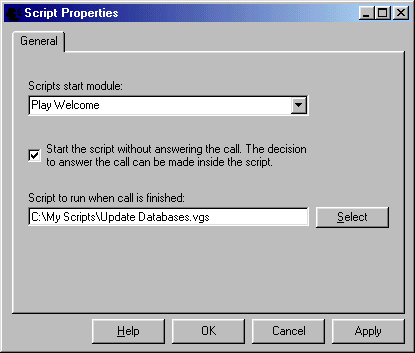
To select this option use the "Script Properties" menu entry from the "Edit" menu in the Graphical Design Environment, then check the "Start the script without answering call" box.
For a given script to answer all incoming calls leave the "Start the script without answering call" box unchecked (this is the default setting for each new script).
Modules allowed before the call is answered
Any modules that do not need to play a sound file can be used. eg:
 |
Database Query |
 |
Web Service Call |
 |
Time Switch |
 |
Evaluate Expression |
 |
Run Program |
 |
Send Email |
 |
Make Call |
 |
Run VB Script |
 |
Hangup the Call |
Arriving at the "Hangup Call" module results in the script finishing and the call never being answered.
Answering the call
Calling any module which plays or records a sound file or transfers the call will result in a call being answered.
Reaching the following modules in the script will effectively answer the call:
 |
Play Sound File |
 |
Record Sound File |
 |
Get Number |
 |
Say Number |
 |
Transfer Call |
