 Send DDE Command
This module sends commands and data to other programs using DDE (Dynamic Data Exchange). You may use Result Variables and this module to pass to other programs information about the Callers ID, or about the selections which the caller has made.
The module uses a Visual Basic type way of specifying the destination application and the command or data to be sent.
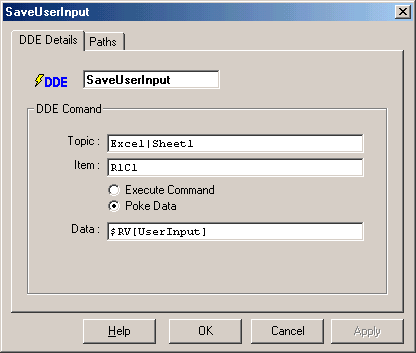
Topic:
This entry includes the destinations Application Name and Subject (otherwise referred to as Service and Topic). Both need to be specified in this field, separated by the | character.
Item:
To what Item will the sent data or command will refer to. Some applications do not require this to be specified, and hence in some cases this entry can be left blank.
Execute / Poke:
Used to select the type of DDE message which is to be sent.
Command
If the Execute Command option is selected, this field holds the actual command transmitted to the destination application.
Data
If the Poke Data option is selected, this field holds the actual data which will be
poked into the specified Item.
If any errors are encountered during the DDE exchange the Fail path will then be taken. Otherwise if the DDE message is sent successfully then the Success path will be taken.
Examples 1:
To put a value 234 in cell A1 of Sheet1 of a currently open Excel document,
select "Poke Data" and then set the following fields:
Topic: Excel|Sheet1
Item: R1C1
Data: 234
Examples 2:
To select Sheet1 in the currently open document in Excel select "Execute
Commend" and then set the following fields:
Topic: Excel|System
Item:
Command: [ACTIVATE("SHEET1")]
